


Hazard Type Default in Storm Track Tool - Hazard Services
Hazard Type Default in Storm Track Tool
Purpose:
This jobsheet will walk the Focal Point through selecting a default hazard type in the Storm Track Tool Dialog window.Tasks:
AT-A-GLANCE:
-
What? Perform a class-based override of getDefaultHazardTypeBySettingsCategory in StormTrackTool.py to update the default hazard type when using the Storm Track Tool.
-
Hazard category configuration. The hazard types that appear as options in the Storm Track Tool depend on the hazard category configuration of your console in Hazard Services. See the image below for Storm Track Tool and hazard viewing options for each configuration.
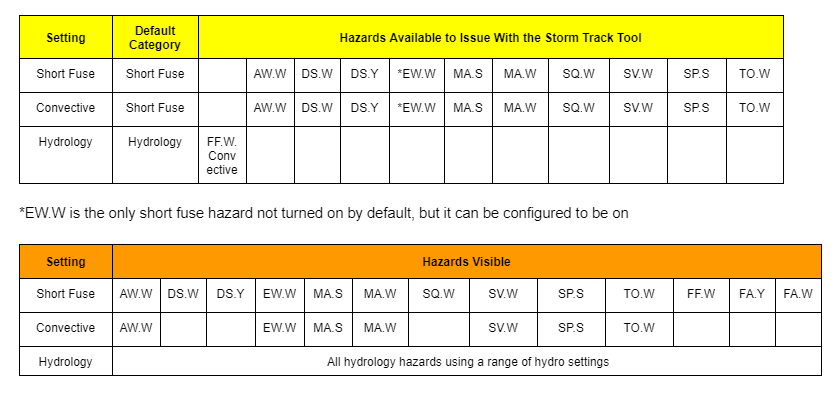
Follow the steps below for more detailed guidance.
Changing the Default Hazard Type in the Storm Track Tool
*NOTE: The default hazard type is set to Severe Thunderstorm Warning (SV.W) when running the Storm Track Tool in the Short Fuse and Convective console configurations. While most sites with routine severe weather won’t want to change that, the example in this section is provided for WFOs that use Special Marine Warning (MA.W) more frequently and would like to set that as the default. Other hazards can be set as default using the same steps.
-
In the Localization perspective navigate to Hazard Services –> Recommenders –> StormTrackTool.py and double click on BASE to load.
-
If a USER override for StormTrackTool.py does not already exist, create one by right-clicking BASE –> Create Override File and selecting User. Open the USER override file.
-
In the BASE file, use Ctrl+F to launch the Find/Replace tool and search for the function getDefaultHazardTypeBySettingsCategory. Copy the entire function definition into the USER override file.
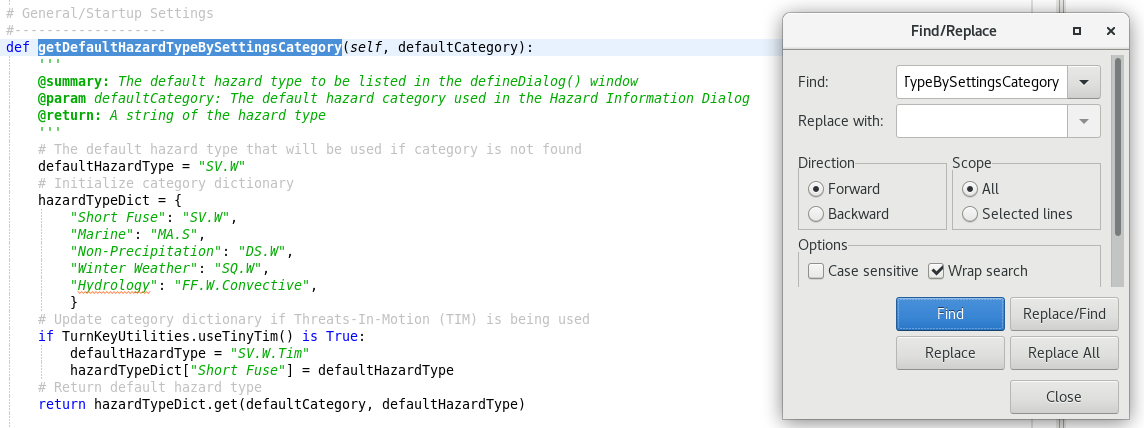
*NOTE: If running an older version of the RPM, within hazardTypeDict, "Short Fuse" will actually be labeled as "Convective". You will need to replace it with "Short Fuse". -
Change the defaultHazardType variable and the dictionary values within hazardTypeDict so your preferred default hazard type appears when opening the Storm Track Tool within the Short Fuse category ("MA.W" below).
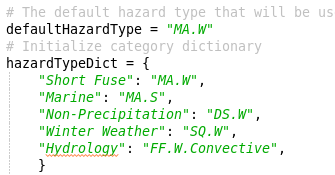
*NOTE: The dictionary entries for “Marine”, “Non-Precipitation”, and “Winter Weather” can be disregarded as the Storm Track Tool is not enabled for those console configurations. -
There is also code in the getDefaultHazardTypeBySettingsCategory function that prepares for the Threats-In-Motion paradigm. While this code will not be used for years, you may also choose to change the default hazard type within that section of the code.

*NOTE: If running an older version of the RPM, make sure to also change “Convective” to “Short Fuse” in hazardTypeDict. -
Save the override file using Ctrl+S. Merge if it asks you to.
-
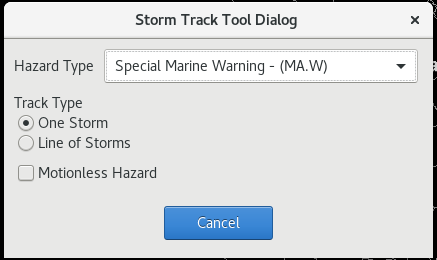
Return to the D2D perspective. Load Hazard Services and run the Storm Track Tool to verify that your preferred hazard now appears as the default in the Storm Track Tool Dialog pop-up.
-
When you are comfortable that the USER override is working as you want, return to the Localization perspective. Promote the USER override to a SITE override by right-clicking USER under StormTrackTool.py in the File Browser and selecting Copy To –> Site.
Congratulations, you've configured the Hazard Type list in the Storm Track Tool Dialog pop-up.